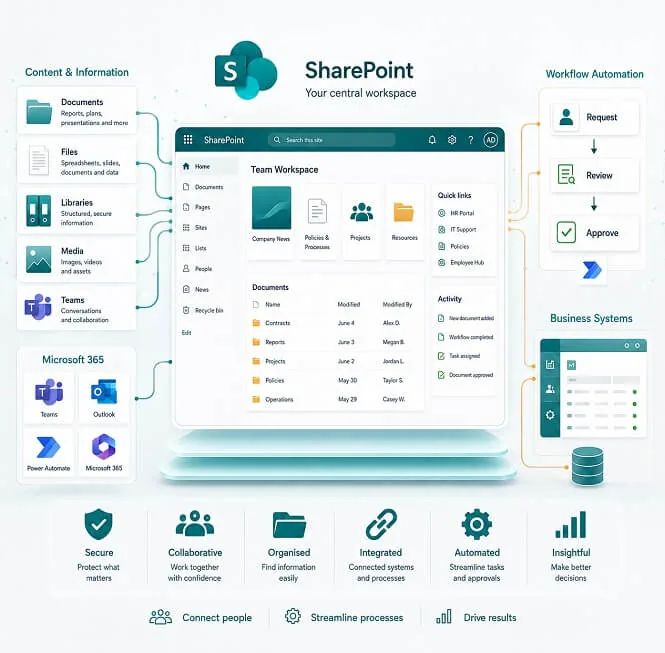

3× faster access to structured information across your organisation
We implement SharePoint environments designed to standardise how organisations store, access, and govern information across teams — reducing fragmentation and making internal knowledge consistently accessible.
Recurring operational patterns we work with
These are not categories, but patterns we encounter consistently across most engagements.
Distributed information across multiple storage points
Documents exist across email, shared drives, local storage, and legacy systems. There is often no single authoritative source.
Informal knowledge structures
Operational knowledge is frequently held by individuals or specific teams rather than documented in a system.
Unclear document authority
Multiple versions of the same file exist across teams, with limited clarity on which is current or approved.
Inconsistent access governance
Permission structures often evolve over time without a unified model, especially in growing organisations.
Fragmented internal systems
SharePoint is typically introduced as a consolidation layer across existing Microsoft 365 and third-party tools.
How we approach SharePoint implementations
Structured around three core principles: clarity, governance, and maintainability.
Information architecture first
We define how information should be structured before implementation begins, including libraries, metadata, and access patterns.
Controlled rollout by business function
We implement in phases, starting with high-impact business areas before expanding system-wide.
Governance aligned to real usage
Permission models and workflows are designed around actual organisational roles rather than theoretical structures.
What we implement
Configured based on organisational requirements — not deployed as a fixed template.
Document & content structure
Standardised libraries with version control, metadata, and search indexing.
Internal portal layer
A central entry point for internal communication and resources.
Workflow automation
Approval flows, notifications, and process automation via Power Platform where required.
Governance & compliance
Role-based access, auditability, and retention policies aligned with internal requirements.
Microsoft 365 integration
Integration with Teams, Outlook, and other Microsoft services as part of the workspace layer.
System integration
Connections to ERP, CRM, or internal applications where SharePoint acts as an information layer.
Patterns commonly observed after stabilisation
Outcomes depend on adoption and existing system maturity. The following are consistently reported across similar environments.
Reduced document duplication
Engineering and operational documents consolidated across sites, with a single authoritative source per document type.
Improved audit traceability
Consistent document control and access logging supports regulatory review without manual preparation effort.
Centralised policy documentation
Policy and procedural documentation made accessible across departments from a single governed location.
Consistent resource availability
Learning and operational materials standardised and accessible across campuses without version fragmentation.
How we deliver
Simple, transparent, and flexible. A structured model designed to reduce ambiguity at each stage of implementation.
Discovery
We review current systems, document flows, and organisational structure to establish a clear baseline.
Solution design
We define architecture, information model, and implementation scope before any build work begins.
Implementation
Delivery is phased, starting with defined business areas and expanding based on validated output.
Validation
We adjust structure based on real usage before broader rollout — no big-bang deployments.
Handover
Full documentation and knowledge transfer for internal ownership. We work alongside your IT team, not in place of them.
Still not sure? We built the risk out of the decision
Share a specific module or feature you’d like developed, and try our service risk-free for one week to experience how we work before signing a final contract
Money-back Guarantee
We’re confident in our developers and delivery quality. If you’re not satisfied with the latest development iteration, we’ll provide a full refund for that iteration.
Flexible Contracts
We provide adaptable contracts, allowing you to adjust your team size as your project scales and matures.
Commercial & practical questions
FAQ
Do we require additional Microsoft licensing?
Most organisations already operate within Microsoft 365, and SharePoint is included in the majority of M365 plans. Whether additional licensing is needed depends on specific requirements — we review your existing entitlements during discovery and flag any gaps before implementation begins.
How long does implementation take?
Duration depends on scope and organisational complexity. A focused rollout covering a single business function typically takes 4–8 weeks. Broader implementations involving multiple departments, system integration, or data migration usually run 3–5 months. We confirm a realistic timeline after the discovery discussion, before any commitment is made.
What happens to existing documents?
Existing content is assessed during discovery. Depending on quality, structure, and relevance, it is either migrated directly, restructured prior to migration, or archived. We do not move content blindly — the migration approach is defined and agreed as part of the solution design phase.
Can SharePoint be deployed outside the Microsoft cloud?
SharePoint Online is the standard deployment model and is suitable for most organisations. Hybrid configurations — where some data remains on-premises — are considered in specific cases, typically where data sovereignty or regulatory requirements apply. We discuss deployment options during discovery based on your environment.
Do you replace internal IT teams?
No. We work alongside internal IT or digital teams throughout the engagement. Handover and knowledge transfer are built into the delivery model so that your team has clear ownership of the system after go-live. Long-term support arrangements are available for organisations without internal SharePoint capacity.
Ready to structure SharePoint around real business usage?
Start with a discovery call to assess current information flows, governance requirements, and implementation suitability.
Book a discovery call“What a fantastic company to work with!
Hired them 4 + years ago, when the project was done I paired down the size of the team and changed our contract from rapid development team to a help desk and internal support. We went from 5 staff members which were all fantastic to 2 members who have remained on our team for almost 4 years now. We are always developing new tools for our internal and external clients and now beginning to develop internal tools using AI.
We treat them like they are our own employees and the support and value add is simply priceless! HIGHLY RECOMENDED!”
— Marc Greenberg