



Four practical controls for truthful completion, safe retry, failure containment and visible recovery during system modernisation.
The Short Answer
A silent workflow failure occurs when a system remains available—or even displays Completed—while the intended business outcome remains incomplete, duplicated or untraceable.
A practical reliability review can focus on four controls. The system should tell the truth about completion, retry without repeating the business action, contain the impact of a failing dependency, and give operations a visible recovery path.
| Control | Question the system must answer | Business risk exposed |
|---|---|---|
| Truthful completion | What must happen before the system says the work is complete? | Premature success and inconsistent system states |
| Safe retry | Can the same request run again without repeating the business action? | Duplicate invoices, payments, claims, updates or notifications |
| Failure containment | Can one slow or failing dependency affect unrelated critical work? | Growing backlogs and wider operational disruption |
| Visible recovery | Can operations find, own, recover and explain failed work? | Failures hidden in logs with no reliable evidence of what happened |
These controls apply to product, operations and technology leaders building or modernising Australian business systems involving claims, invoice processing, customer portals, scheduled work or third-party integrations.
The framework connects customer-visible status, operational ownership and release evidence. It synthesises common delivery concerns with public Microsoft and AWS guidance; it is practitioner guidance, not an industry standard.
Where Silent Failures Create Business Risk
An operations user submits an invoice through a portal. The screen displays Completed.
Behind that screen, the system may still need to store the record, validate it, send it to another platform, receive confirmation, update the customer-facing status and preserve an audit record. If one step is delayed or fails, the user-facing action and the business outcome can diverge.
Nothing necessarily crashes. There may be no red error banner or obvious outage. The problem appears later, when finance finds a reconciliation mismatch, a customer asks why the status never changed, or operations discovers work that has been waiting unnoticed.
| User action | Work that may continue afterwards | Business risk if it fails silently |
|---|---|---|
| Submit a claim or invoice | Validate, store, transmit, receive confirmation and update status | Delayed processing, missing submission or manual reconciliation |
| Upload a document | Scan, verify, index, apply permissions and notify a reviewer | The portal says uploaded, but the document is unusable or invisible |
| Change a client status | Update internal records, downstream platforms, dashboards and notifications | Staff and customers act on different versions of the truth |
| Trigger a payment-related action | Send the request, confirm the result and record the outcome | An uncertain response leads to a duplicate or missing action |
Many workflows continue after the user's request has returned: validation, transmission, confirmation and status updates may still be in progress. Software teams typically implement this work as background or asynchronous processing.
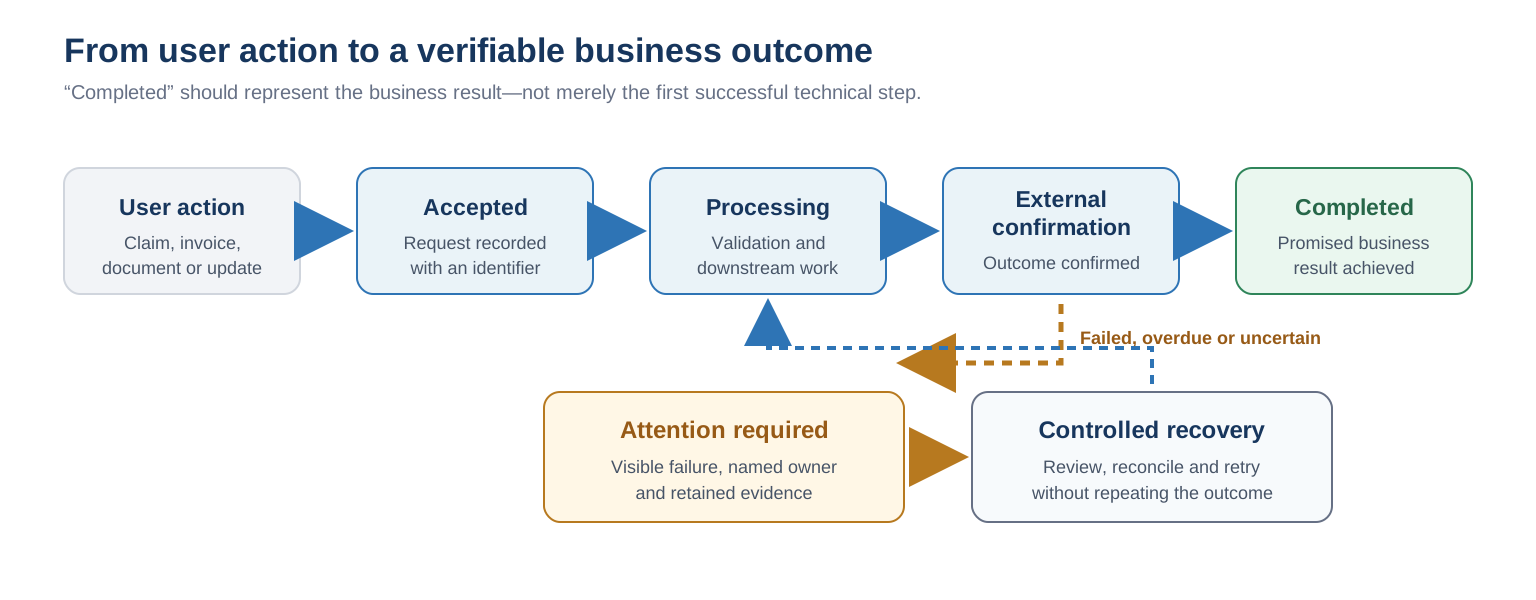
The design question is not whether the system uses a queue. A queue can buffer work, but it does not define when the business action is complete, whether a retry is safe, who sees a permanent failure or how the work is recovered.
Key principle: reliability is not demonstrated by the normal path alone. When a critical action is marked complete, the team should be able to prove the promised business outcome and show what happens when work is late, duplicated or uncertain.
For customer portals, this completion question is separate from external access and information boundaries. Our guide to evaluating a customer portal development partner explains how to assess that second risk.
How the Four Controls Work
The four controls are not technology choices. They are review conditions that connect customer-visible status, system behaviour and operational ownership to evidence the delivery team can demonstrate before release.
1. Truthful Completion: What Does “Done” Actually Mean?
Truthful completion defines success as the required business outcome, not the first technical step that returned successfully.
A technical step may complete while the business transaction remains open. A portal may store an invoice before the accounting platform accepts it; a document may upload before verification; a claim may enter processing without the confirmation the business relies on.
Many systems must respond before downstream work finishes. The risk is presenting an intermediate technical state as a completed business outcome. A truthful model distinguishes Accepted, Processing, Completed and Attention required, with an agreed business meaning for each state.
Marking work complete too early hides failure; marking it too late can cause successful work to be repeated. The system needs a clear completion rule: the event, confirmation or reconciled state that allows the workflow to move forward.
AWS describes a related reliability problem as a dual write: one business action updates a database and sends a message to another service. If one succeeds and the other fails, the systems can disagree. Its transactional outbox guidance is one pattern for keeping the stored change and downstream event consistent, not a requirement for every system (AWS Transactional Outbox).
The rule should also define what users see when a downstream service is unavailable. A delayed low-risk notification may be acceptable; a financial, care or compliance-sensitive action may need to remain Processing or Attention required.
What to ask: “Which business event—not which line of code—allows this workflow to display Completed?”
What strong evidence looks like: A workflow map connects every customer-visible state to the required records, downstream confirmations and exception paths. The team can explain what happens if the screen succeeds but the next step does not.
2. Safe Retry: Can the System Try Again Without Repeating the Outcome?
Safe retry means the same request can run again without repeating the invoice, claim, payment-related action, notification or status change.
An external service can complete a request but fail to return a response. The sending system then faces an uncertain result: retrying may be necessary, but it may repeat an action that already happened. Retry behaviour is therefore a business rule, not only a technical setting.
Microsoft notes that many queue-based systems can deliver the same message more than once and recommends duplicate-safe processing to avoid repeated records or charges (Queue-Based Load Leveling). AWS makes the same point in its transactional outbox guidance.
This property is known as idempotency. The test is whether the system can receive the same instruction twice and still prove that the business action happened only once.
What to ask: Can the team demonstrate an uncertain timeout followed by a retry using the same business transaction?
What strong evidence looks like: The system uses a stable transaction or request identifier, detects previous completion, avoids duplicate side effects and records the decision. “The queue normally sends it once” is not duplicate protection.
3. Failure Containment: Can One Slow Service Disrupt Unrelated Work?
Failure containment limits the effect of one dependency problem so the rest of the operation can continue at an agreed level.
If an external accounting, payment, identity or partner service slows down, requests wait, retries add load and limited processing capacity is consumed. When critical and low-priority work share that capacity, one dependency problem can delay unrelated workflows.
A queue can help buffer variable demand, but Microsoft warns that an unchecked backlog increases latency, rapid retries can worsen overload, and scaling workers without protecting downstream capacity can simply move the bottleneck (Queue-Based Load Leveling). Its transient-fault guidance also recommends finite retries and circuit breaking for dependencies that continue to fail (Transient Fault Handling).
The response should be risk-based. A separate processing path may be justified where delay, duplication or failure affects customers, finance, care delivery, compliance or staff operations. Lower-risk work may remain on a shared path with appropriate capacity and monitoring.
During a dependency failure, the design may combine time limits, slower retries, a temporary stop to repeated calls, protected capacity for critical work and a clear Processing or Attention required state. The combination should follow business impact.
What to ask: “If this external service becomes slow, which other workflows are affected, and what will customers and operations teams see?”
What strong evidence looks like: The team can identify shared dependencies, capacity limits, timeout and retry behaviour, degraded states, alert thresholds and the point at which work requires intervention.
4. Visible Recovery: Can Operations Find and Resolve Failed Work?
Visible recovery means failed or overdue work can be found, owned and resolved without requiring operations teams to search raw application logs.
Critical work that cannot complete automatically needs a known destination, enough context, a named owner and a controlled way to retry, repair or compensate for the result.
Some queue technologies provide a dead-letter queue: a holding area for repeatedly failed work. Microsoft recommends monitoring this path so operations can investigate and resubmit work where appropriate (Queue-Based Load Leveling). The technology is not the recovery process: someone must own the decision, prevent duplication and record the resolution.
Microsoft's background-job guidance recommends tracking completion rather than only job start, monitoring failed-work queues and measuring enqueue-to-completion latency because business impact depends on the full time a transaction remains unfinished (Best Practices for Background Jobs). Depending on the workflow, teams may also watch oldest-item age, work waiting beyond an agreed service level, exhausted retries, reconciliation mismatches and unresolved recovery actions.
A traceable history should show the transaction identifier, status changes, timestamps, retries, last known error and manual recovery actions. The record should reflect the workflow's operational and regulatory requirements; not every system needs an immutable ledger.
What to ask: “Who knows this work failed, where do they see it, and how can they recover it without searching raw logs?”
What strong evidence looks like: An operations-facing view or report shows failed and overdue work, alerts have a severity and owner, recovery is controlled, and the final outcome remains traceable.
Pre-Launch Critical Workflow Review
Before approving a new workflow or a rebuild, walk through one real claim, invoice, document or integration from the user's action to the final business outcome.
If an existing processing path is being replaced, include work already in progress. The release plan should assign ownership to the old or new version, reconcile transaction identifiers and support safe replay or rollback. For this specific cutover risk, see Why Dual-Running Needs Reconciliation in Legacy Migration. Our guide to reducing risk during system migration and cutover covers the wider migration decision.
| Question to ask | Strong evidence | Risk signal |
|---|---|---|
| What exactly does Completed mean? | A defined business outcome, required confirmations and customer-visible state | Completion means only that the first request returned successfully |
| What happens if the external result is uncertain? | The same transaction can be checked or retried safely without repeating the outcome | The team retries and assumes duplicates are unlikely |
| What happens when a dependency becomes slow? | Timeouts, bounded retries, degraded states and impact boundaries are defined | Processing capacity remains occupied or rapid retries deepen the backlog |
| Where does permanently failed work go? | It is preserved, visible, assigned and recoverable | It remains in logs until a customer or staff member reports it |
| What triggers an operations alert? | Thresholds reflect overdue business work and have a named response owner | Alerts cover infrastructure only, or fire on every technical error |
| What evidence is retained? | Status, timestamps, retries, errors and recovery actions can be traced by transaction | The incident must be reconstructed from scattered logs |
| What happens to work already in progress at cutover? | Ownership, reconciliation, safe replay and rollback evidence are defined | The change is treated as a normal deployment |
If the answers are specific and tied to a real transaction, the design conversation is grounded. If the answers stay at “we use a queue”, “the platform retries automatically” or “developers can check the logs”, the business outcome has not yet been designed.
How to Evaluate a Development Partner for Critical Workflow Work
A partner who understands business-critical systems should not begin with “we will add a queue”. The team should first identify the outcome users rely on, the cost of delay or duplication, the systems involved, the owner of failed work and the proof required before release. Queues, retry controls, duplicate protection and failed-work handling are engineering choices; what matters is whether each choice connects to a business consequence and the team can demonstrate the complete success, failure and recovery lifecycle.
A credible proposal should therefore describe the evidence to be delivered—workflow states, failure tests, recovery ownership and release reconciliation—not merely name a queue, integration platform or cloud service.
Workflow reliability is only one dimension of partner fit. For the wider questions of team continuity, direct accountability, Australian market knowledge and AI governance, use our four-factor guide to evaluating a long-term software development partner.
Frequently Asked Questions
What is a silent workflow failure?
In this article, it means a system remains available and may display success, but the intended business outcome—such as submitting a claim, synchronising an invoice, updating a portal or completing an integration—does not occur, is delayed, is repeated or cannot be proved.
How can a retry avoid creating a duplicate invoice or payment-related action?
Use a stable business transaction identifier and design the receiving process to recognise work it has already completed. Before repeating the side effect, the system should return or reconcile the existing result. This is idempotency, or duplicate protection.
What should operations teams monitor?
Monitor the business backlog, not only server health: overdue items, oldest-item age, processing latency, exhausted retries, failed-work growth, reconciliation mismatches and unresolved recovery actions. Each alert should have an agreed threshold, severity and owner.
How should an Australian business evaluate a development partner for this work?
Give the proposed team one real claim, invoice, portal or integration workflow. Ask it to define completion, demonstrate safe retry, explain failure containment, show operational recovery and account for work already in progress during release. Evaluate the evidence it leaves behind, not whether it can name the relevant technologies.
What relevant experience does Shinetech have with critical workflow modernisation?
Founded in 2001, Shinetech Software supports Australian businesses through offices in Sydney and Melbourne and works across healthcare, finance, retail, logistics and other operationally complex sectors. Shinetech's published healthcare and human-services case study documents work involving claims, reimbursements, invoice processing and partner integrations at scale. The case study reports a seven-year active partnership and a platform that now supports 30,000+ users across five companies.
Next Steps: Review One Critical Workflow
A reliable workflow does more than accept work. It tells the truth about progress, prevents retries from repeating the outcome, limits the impact of a failing dependency and gives operations a controlled way to recover what automation cannot complete.
That is the standard a modernisation partner should be able to explain before implementation—and prove before release.
If you are modernising a claims, invoicing, customer-portal or integration workflow, bring one critical transaction path. We can help identify where work could be delayed, repeated, lost or become invisible—and what evidence the delivery team should provide before release.
Discuss a business-critical workflow with Shinetech →
Related reading: How to Evaluate a Customer Portal Development Partner in Australia · Why Most System Migrations Fail—and How to Do It Safely · What Lasting Australian Software Partnerships Have in Common
Sources
- Microsoft Azure Architecture Center. Queue-Based Load Leveling pattern.
- Microsoft Azure Architecture Center. Best practices for background jobs.
- Microsoft Azure Architecture Center. Transient Fault Handling.
- AWS Prescriptive Guidance. Transactional Outbox pattern.
- Shinetech Software. About Shinetech Software Australia. Company-reported history and office information.
- Shinetech Software. Modernising CRM for a health and human services provider. Company-reported project information.
The scenarios in this article are illustrative, not reported client incidents. The Shinetech case study establishes relevant delivery experience but does not state that the client experienced these failure modes. This article provides general software design and partner-evaluation guidance; it is not legal, financial, healthcare, NDIS or regulatory compliance advice.