

E-commerce · Channel Integration case study
Scaling Salesforce and SAP integration with MuleSoft
Adding Salesforce Commerce and store orders to Magento and NuORDER can multiply separate SAP integrations. Shinetech’s integration approach uses MuleSoft to share product, order and fulfillment processes while keeping channel-specific adapters.
- Salesforce
- MuleSoft
- SAP
- System integration
At a glance
- Business need
- Reduce duplicated channel integrations as commerce operations expand
- Salesforce scope
- Salesforce Commerce order and fulfillment integration
- Connected systems
- MuleSoft, SAP S/4HANA, Magento, NuORDER and Manhattan Active Omni (MAO)
- Delivery focus
- Integration architecture, implementation and operational recovery
The situation
Every new channel repeated the same SAP work
Magento and NuORDER already reached SAP S/4HANA through custom services. When Salesforce Commerce and Manhattan Active Omni entered the channel roadmap, each new connection threatened to repeat the same product, order and fulfillment work.
Product feeds, order creation and fulfillment updates each carried their own SAP access, mappings, error handling and deployment. Every new channel increased the support burden.
The challenge
Shared access must accommodate different failure modes
Each channel has its own formats and release needs. A delayed product feed should not hold up other channels, while an uncertain SAP order response must not lead to a duplicate order. The common design needs to preserve those differences.
The solution
Channels reused the same order process
The integration design brings the Magento and NuORDER connections, together with Salesforce Commerce and MAO, into MuleSoft. SAP and each channel keep their own connection, so a change on one side does not disturb the other.
Three shared processes carry the product, order and fulfillment work, translating each channel’s format into one common model for products, orders, shipments and invoices.
Workflow detail
Three shared flows served four channels
| Process | Direction | Business purpose |
|---|---|---|
| Sellable product distribution | SAP → sales channels | Publish product, price and availability through the channel adapters. |
| SAP sales order creation | Sales channel → SAP | Convert the channel order and create the SAP sales order. |
| Fulfillment result distribution | SAP → original order channel | Return shipment, invoice and cancellation information to the correct channel. |
Workflow detail
Product publishing and order submission failed differently
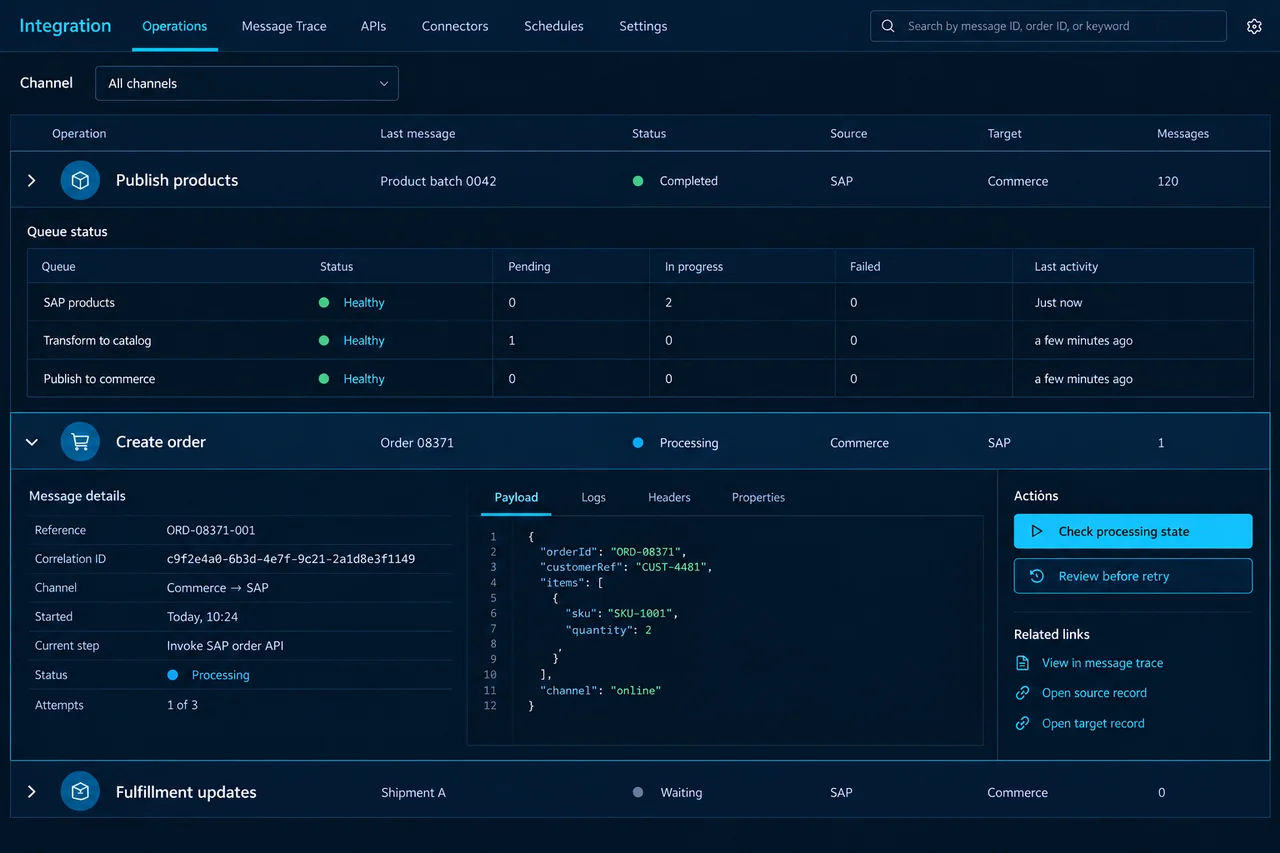
Product distribution used queues to separate channel updates. Order creation used a direct request to SAP, with a processing-state check when the response was uncertain.
Independent product publishing
Queued product updates decoupled the channels from each other. An unavailable channel could recover its outstanding updates without holding up the others.
Safe order submission
If SAP order creation timed out, the integration checked whether SAP had created the order before deciding on another submission.
Workflow detail
Recovery became part of the shared flow
Version controls stopped old product updates overwriting newer data. Transaction identifiers protected order creation and fulfillment updates from duplicate processing.
Technical failures followed retry rules; business errors retained the response for correction. Shared reference fields let support trace a channel request to the exact step that failed.
The next channel reused more than code
Monitoring brought volume, response time and errors into one operating view. Support could trace an order number or product reference without entering separate custom services.
Salesforce Commerce and MAO added their own adapters and mappings while reusing SAP access and the shared processes. Channel-specific changes remained in the relevant adapter.
How we work
Define the shared contracts, then verify each channel
Work begins with one representative product, order and fulfillment exchange from each channel. The team agrees the common contracts before developing the SAP connection and channel adapters.
Verification covers an offline channel, an older product event, a repeated order and an uncertain SAP response. The handover includes mappings, reference fields and recovery instructions for these cases.
The result
A shared integration foundation for channel growth
Development
A new channel reuses the established SAP access, process logic and data models.
Operations
Support monitors channel traffic, traces failures and follows the agreed recovery path from one operating view.
SAP remains responsible for product, pricing, availability, sales orders and fulfillment. MuleSoft connects those responsibilities to the channels that need them.
Case taxonomy
Explore the industry, technology, and business need.
Industry and product
- Retail
- E-commerce
- Omnichannel Commerce
Technology and delivery
- MuleSoft
- SAP S/4HANA
- Salesforce Commerce
- System Integration
Business need
- Channel Integration
- Product Distribution
- Order Creation
- Fulfillment Updates
- Error Recovery