

Education · School and nonprofit fundraising
Turning a calendar pledge into a traceable donation
A school fundraising idea became an operating platform that connects interactive campaigns, payment confirmation, and donation records for organizations and participants.
- Fundraising
- Payment integration
- Donation attribution
- Web platform
At a glance
- Business need
- Turn fundraising ideas into manageable campaigns
- Product
- School and nonprofit fundraising platform
- Delivery
- Product development from an initial concept
- Technology
- Web application and payment integrations
The business context
The supporter sees a simple choice. The organizer needs a reliable record.
A calendar fundraiser gives a supporter an immediate way to participate: choose a date and donate the corresponding amount. Image-based campaigns use a related idea, letting contributions reveal parts of a picture. The interaction is approachable, but the money still has to belong to the correct organization, campaign, and participant.
The client began with fundraising ideas and a school-community perspective, rather than a complete software specification. Shinetech helped turn those ideas into a working product. That meant defining what happens before and after a donation as carefully as the activity the supporter sees.
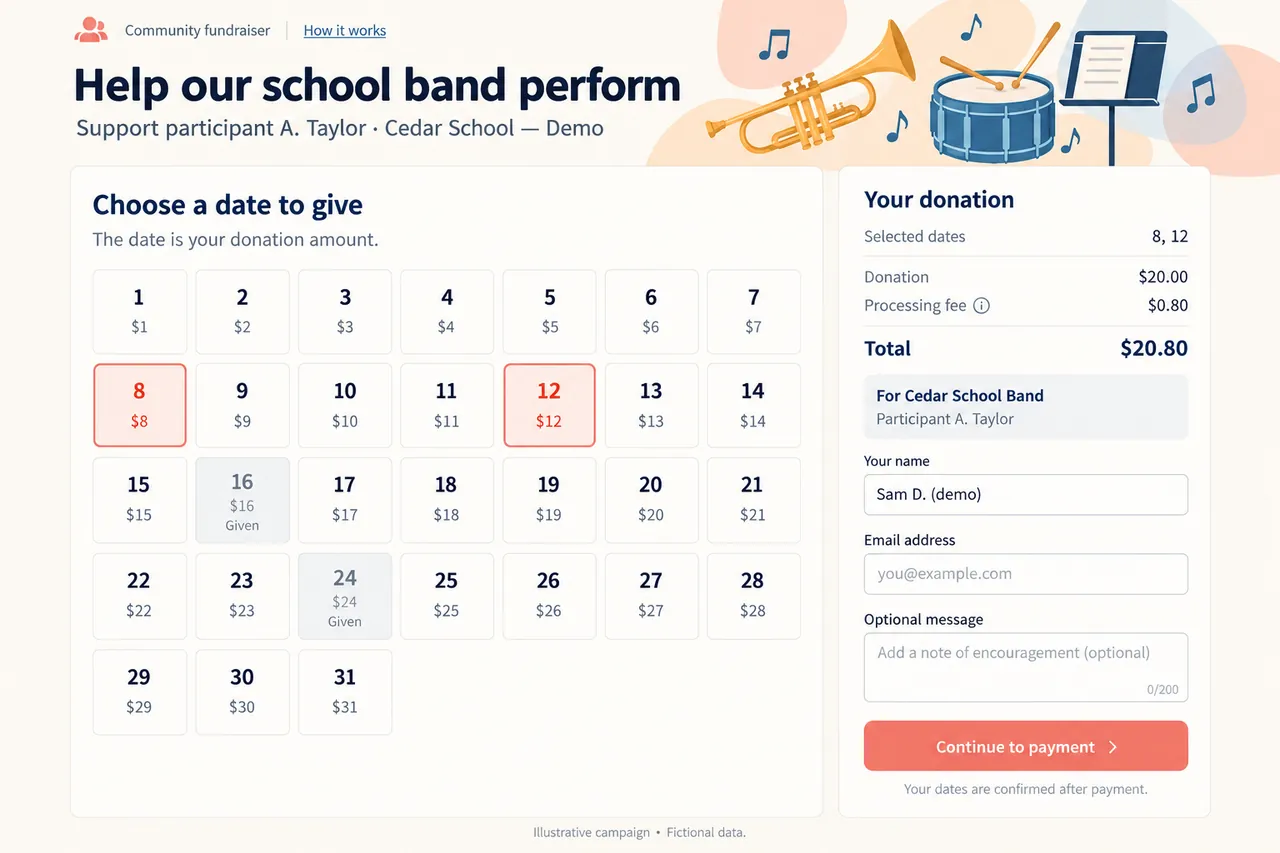
A contribution starts with a choice
A supporter is reviewing a selection before payment. The dates, amount, fee, and participant context agree across the page. Reconstructed interface with a fictional organization and sample fee. View full-size interface (new tab)
The operating challenge
A selected square is not yet a completed donation.
A participant shares a campaign link; a supporter selects dates or picture elements and moves toward payment. The system must carry the campaign and participant context through that transaction. It also needs to distinguish an intention to give from a confirmed payment, calculate the applicable fee, and update the records used to show fundraising progress.
Different formats introduce different interactions. A numbered calendar, a farm-themed activity, and a puzzle cannot all use the same public presentation. Yet building separate administration and payment processes for each would make the platform harder to operate. The team had to identify what changes with the activity and what belongs in a shared foundation.
The delivery decisions
Keep the activity distinct and the donation record consistent.
- 01
Define the full participation path
Through continued discussion, the team clarified how activities are created, how participants are represented, where donations belong, and what organizers need to manage. Development proceeded in stages around usable campaigns, payment, and administration. The starting point was the client’s fundraising idea; the deliverable had to support the complete operating process.
- 02
Build multiple ways to contribute
Shinetech implemented calendar, farm, and puzzle formats with activity display, supporter participation, and progress presentation. Organizations, campaigns, and participants provide the shared structure beneath those experiences. This keeps the meaning of a donation consistent even when the visible interaction changes.
- 03
Connect payment to the right records
The platform links payment confirmation, fee calculation, result updates, and donation ownership. Administration supports organization and participant management, campaign activity, donation queries, and fundraising statistics. An organizer can follow a contribution back to its relevant campaign and participant instead of having only an unexplained payment total.
How the workflow holds together
The transaction carries the story from the public page to administration.
Before payment confirmationIn the reconstructed example, the supporter chooses dates 8 and 12 for a $20 donation. The summary retains the fictional school, campaign, and participant, shows a sample fee separately, and sends the supporter onward to payment. The page is still awaiting confirmation; the selected dates are not presented as completed donations. The numbers illustrate the interaction and are not the client’s fee schedule.
After payment confirmation, the result needs to reach the donation record and campaign progress. That continuity is what makes the playful experience operationally useful. The same organization can offer different formats while retaining a common way to understand who contributed, which activity they supported, and how that contribution is attributed.
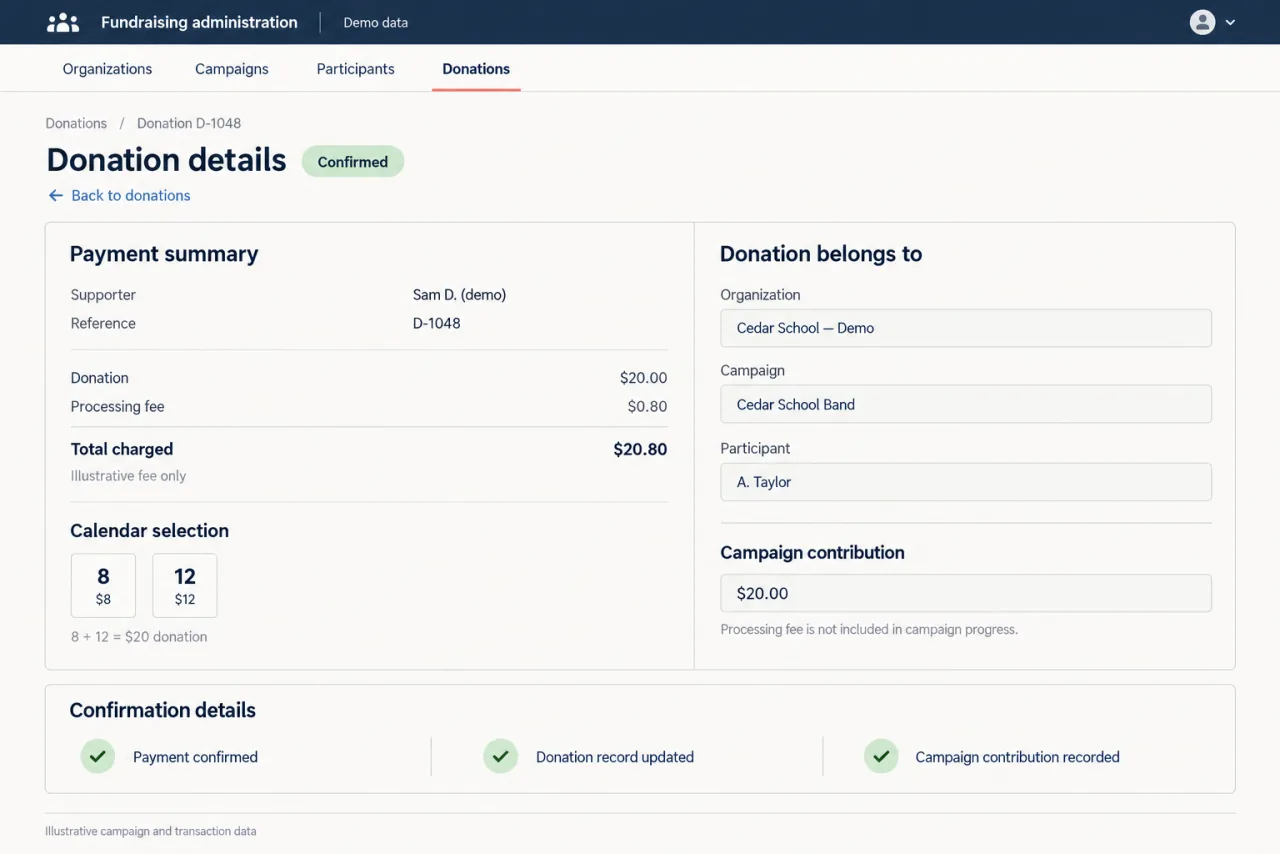
After payment confirmation
The next state in the fictional example: after payment confirmation, the $20 donation is attributed to the school, campaign, and participant. The sample $0.80 fee is shown separately. Reconstructed interface with invented records; not the client’s screen or fee schedule. View full-size interface (new tab)
The delivered result
An initial idea became a platform for live fundraising.
Working campaigns
Calendar, farm, and puzzle activities let supporters participate through distinct experiences.
Attributed payments
Confirmed payment information connects to the relevant organization, campaign, and participant.
Shared administration
Organizers can manage activities, review donations, and follow fundraising progress.
The delivered platform is used for live fundraising. Fundraising volume is not treated as the client’s revenue or as an increase caused by this development work.
Case taxonomy
Searchable by industry, technology, product, and business need.
Industry and product
- Education & EdTech
- School fundraising
- Nonprofit fundraising
Technology and delivery
- Web platform
- Payment integration
- Product development
Business need
- Fundraising
- Calendar pledges
- Payment confirmation
- Donation attribution
- Campaign administration